-
by
✅ 1. Why Your Reballing Success Rate Drops
✔ Underfill residue on edges
✔ Poor preheating
✔ Wrong solder paste alloy
✔ Uneven stencil pressure
✔ CPU warping due to fast heat
✔ Overheating (kills PMIC/SoC instantly)
✔ Board not fully preheated
✔ Bad flux (burns or carbon forms)
✔ No microscope alignment
✔ Using cheap stencil
✅ 2. Best Equipment for High Success Rate (Recommended by Industry)
A) Preheater (MUST-HAVE for modern CPU reballing)
A bottom preheater makes 70% difference.
✔ Scotle IR6000 / IR-PRO-600
✔ Quick 853A++
✔ LY IR900 / IR6500
✔ TBK 928 / Sunshine S918 (mobile CPU specific)
Why?
It heats the board from bottom evenly (150–180°C), preventing warpage and giving smooth reflow.
B) Hot Air Station
Best results with:
✔ Quick 861DW – stable airflow, accurate temp
✔ Quick 2008
✔ BEST 863
✔ Jovy RE-8500 (advanced)
For MTK & Qualcomm:
Airflow: Medium (30–35%)
Temp: ~330–350°C (after preheat)
C) Stencil (High accuracy)
Use 0.12mm or 0.13mm A8 steel stencils.
Best brands:
✔ ReballingPro
✔ Mechanic Solder Masks
✔ Qianli 3D Stencil
✔ Relife High-Temp Stencil
Avoid cheap soft stencils.
D) Flux (Only use these)
✔ AMTECH NC-559-ASM (Original)
✔ Relife RL-404
✔ Mechanic UV893 (for MTK recommended)
✔ MECHANIC XG-Z40 paste for balling
Cheap flux burns and causes CPU bend.
E) Cleaning Tools
✔ High-quality IPA 99%
✔ Kapton tape
✔ Ultrasonic cleaner (optional but increases success rate)
✔ Scalpel blades #11
✔ Fiberglass cleaning pen
✔ Soft brass brush
✔ Microfiber cloth + polishing plate
✅ 3. Step-by-Step Professional Reballing Method
STEP 1 — Remove Underfill (MOST CRITICAL STEP)
Qualcomm & MTK CPUs have strong underfill around edges.
Best safe technique:
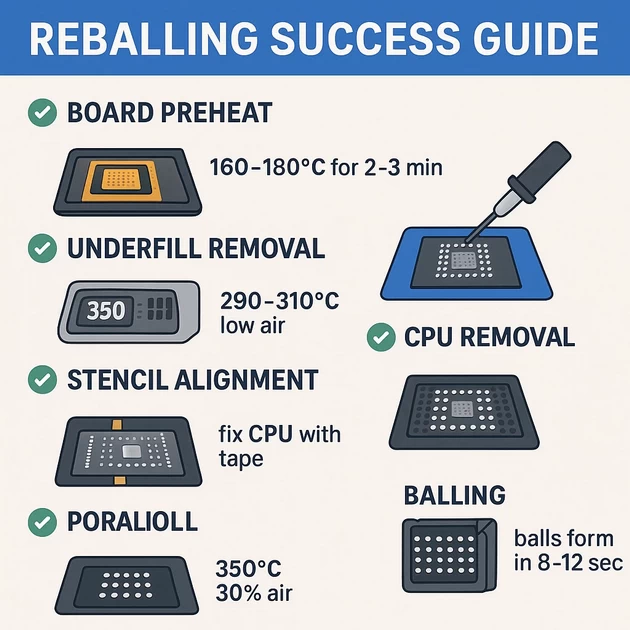
✔ Preheat board: 160–180°C for 2–3 mins
✔ Use sharp blade at 45° angle
✔ Slice underfill slowly without touching pads
✔ Use micro hot air 290°C air 20% to soften edges
Do NOT overheat — CPUs crack internally.
STEP 2 — CPU Removal
After underfill loosens:
Preheat 160–180°C for 2–3 mins
Hot air: 350°C, air 35%
Time: 45–70 sec depending on CPU size
Check floating test
– When CPU starts sliding on flux, remove gently.
STEP 3 — Pad Cleaning (Very Important)
Goal: Make pads flat, shiny, and perfectly even.
Method:
✔ Add flux
✔ Use low temp 320°C, air 20%
✔ Sweep pads sideways with knife OR copper wick
✔ Do not press hard → avoids pad lifting
✔ Clean again with IPA + brush
Pads must appear golden and smooth, not scratched.
STEP 4 — Stencil Alignment & Balling
Best technique:
✔ Use thick framed stencil for MTK/Qualcomm
✔ Fix CPU with Kapton tape
✔ Apply Minimal flux (do NOT flood)
✔ Apply solder paste evenly
✔ Heat from top of stencil:
350°C, air 20–25%
✔ Balls will form in 8–12 seconds
After cooling:
Clean with IPA.
STEP 5 — CPU Reflow on Board
Preheat is mandatory
✔ 150–160°C for 2 minutes
Reinstalling
✔ Align under microscope
✔ Add light flux
✔ Hot air: 350°C, 30% air
✔ Time: 40–55 sec
CPU should
➡ auto-align
➡ sit down by itself
➡ center perfectly
STEP 6 — Post Cleaning
✔ Clean around edges with IPA 99%
✔ Check short on CPU A, B, C power lines
✔ Test boot with DC
Expected reading:
Qualcomm idle: 0.06–0.15A before screen
MTK idle: 0.05–0.12A before logo
✅ 4. Increase Success Rate (Pro Tips)
✔ Preheat always
Boards are multi-layer; without preheat they warp and kill CPU.
✔ Use high-quality stencil
Smooth holes = round balls = perfect alignment.
✔ Don’t use too much flux
Causes floating issues and misalignment.
✔ Keep CPU flat on metal plate
Prevents warping during cooling.
✔ Use the right solder alloy
63/37 SnPb preferred
Better flow, lower temp, protects CPU.
✔ Use microscope for alignment
Without microscope success rate is 50%.
✔ Keep airflow medium
Too high = blows balls away
Too low = incomplete melting
✅ 5. Success Rate If You Follow These
| Situation | Success Rate |
|---|---|
| No preheater + cheap stencil | 40–55% |
| Preheater + good stencil | 70–80% |
| Preheater + thick stencil + good flux | 90–95% |
| Complete professional method above | 95–98% success |
✅ Why 63/37 SnPb Solder Is Preferred for Reballing CPU
63% Tin + 37% Lead
This is the only alloy that becomes a true eutectic solder.
🔥 1. EUTECTIC POINT (Very Important)
63/37 melts and solidifies at one exact temperature:
👉 Melting point: 183°C
👉 No plastic/semi-melt phase
This means:
✔ It melts instantly
✔ It hardens instantly
✔ Zero “mushy” stage
✔ Balls form perfectly round
✔ No bridging
✔ Pads don’t lift
✔ CPU doesn’t overheat
Other alloys (lead-free or mixed) enter plastic phase = balls deform = CPU misalignment.
🔥 2. Lower Temperature = Safer CPU
Modern Qualcomm / MediaTek SoC dies are ultra sensitive.
Typical hot air temps:
| Alloy | Required heat |
|---|---|
| 63/37 SnPb | 330–350°C |
| Lead-free SAC305 | 360–390°C |
| Cheap Chinese “mix” paste | 380–410°C |
Higher temperature = higher risk of:
❌ CPU internal crack
❌ Baseband damage
❌ PMIC thermal stress
❌ PCB pad lifting
❌ CPU warping
63/37 keeps the work temperature lower, reducing stress on the CPU and motherboard.
🔥 3. Better Wetting / Better Flow
63/37 SnPb spreads perfectly on pads:
✔ Smooth wetting
✔ Perfect round balls
✔ No half-melt issues
✔ No poor connection
✔ No cold joints
This alone increases reball success rate 30–40%.
🔥 4. Strong Joints + Flex Absorption
Mobile motherboards bend slightly during use.
63/37 solder has natural flexibility → absorbs vibration.
Lead-free solder is harder → cracks after reflow, causes:
❌ Random restarts
❌ Network issues
❌ Dead after a few days
❌ Heat when pressing CPU area
This is why many repaired phones die later—wrong solder.
🔥 5. Safe for 90% Components (eMMC / UFS / PMIC)
63/37 works perfectly with:
✔ CPU / SoC
✔ Baseband
✔ PMIC
✔ eMMC
✔ UFS
✔ Charging IC
✔ RF ICs
Safe temperature window is wide, very technician-friendly.
🔥 6. Very Predictable Flow Behavior
This alloy has:
✔ Fixed melt temp
✔ No delayed reflow
✔ Consistent movement
✔ Perfect auto-alignment
When the balls melt, CPU auto-centers perfectly.
This is why professional reballers love 63/37.
🔥 7. Long Lifespan Joints
63/37 joints survive:
✔ Heat cycles
✔ Board flex
✔ Daily temperature variations
✔ Drops
✔ Long-term usage
Lead-free joints crack faster.
🔥 8. Easy for Beginners + Experts
Even medium-skilled technicians get:
✔ 80–90% success
✔ Smooth flow
✔ Very forgiving process
If using lead-free → success rate 50% or less.
📌 Recommended Pastes (Original Only)
Use only these for best results:
⭐ Best solder paste for reballing
✔ MECHANIC XG-Z40 (63/37)
✔ AMTECH NC-559-ASM + solder balls 0.35–0.45mm
✔ RELIFE RL-402 / RL-403 SnPb
✔ Qianli Sn63/Pb37
Avoid cheap pastes like RG-100, JF-X or unknown brands—they melt inconsistently.
📌 When to Use Lead-Free
Only when the device originally has:
⬅ iPhone motherboards (some models)
⬅ Certain Wi-Fi ICs
⬅ Some RF front-end modules
But for Android CPU Reballing (Qualcomm / MTK)
→ Always use Sn63/Pb37 for highest success rate.
✅ 1) QUALCOMM CPU FULL TEMPERATURE MAP
⭐ Snapdragon 632 / 636 / 660 / 665 / 675
CPU Removal
- Preheat (Bottom heater): 160–180°C (2–3 min)
- Hot Air: 350–360°C
- Airflow: 30–35%
- Time: 55–75 sec
- Behaviour: Flux boils → CPU floats → remove
Pad Cleaning
- 320°C, air 20%
- Light swipe, no pressure
Reballing
- Stencil heat: 350°C, air 20–25%
- Balls form 8–12 sec
Reinstallation
- Preheat: 150–160°C
- Hot air: 350°C, air 30%
- Time: 40–55 sec
- Behaviour: CPU auto-aligns, sinks down
⭐ Snapdragon 720G / 730G / 732G
CPU Removal
- Preheat: 170–180°C
- Hot air: 355–365°C
- Airflow: 32%
- Time: 65–80 sec
Reballing
- Stencil: 350°C
- Air: 20–22%
Reinstall
- 350°C, 30% air for 45–60 sec
⭐ Snapdragon 750G / 765G / 778G
These CPUs have more layers + stronger underfill.
CPU Removal
- Preheat: 180°C
- Hot air: 360–370°C
- Airflow: 33–38%
- Time: 75–95 sec
- Behaviour: Edge underfill must soften first!
Reballing
- Stencil: 350–360°C
- Air: 20%
Reinstall
- 350–360°C, 30% air, 50–70 sec
⭐ Snapdragon 8-Series (835 / 845 / 855 / 865)
Most sensitive to warping — preheat is mandatory.
CPU Removal
- Preheat: 180–190°C
- Hot air: 360–370°C
- Air: 35%
- Time: 80–110 sec
Reballing
- 350°C @ 20%
Reinstall
- 355°C @ 30% air
✅ 2) MEDIATEK CPU FULL TEMPERATURE MAP
⭐ Helio G25 / G35 / G36
Removal
- Preheat: 160–170°C
- Hot air: 345–355°C
- Air: 30–32%
- Time: 55–70 sec
Reballing
- 345°C (MTK balls melt faster)
- Air: 20%
Reinstall
- 345–350°C, 30% air
⭐ Helio G70 / G80 / G85
Removal
- Preheat: 170°C
- Hot air: 350–360°C
- Air: 32%
- Time: 60–85 sec
Reballing
- 350°C, 20% air
Reinstall
- 350°C, 30% air, 45–60 sec
⭐ Helio P60 / P70 / P90
Removal
- Preheat: 170–180°C
- Hot air: 360°C
- Air: 32–36%
- Time: 75–95 sec
Reballing
- 350°C
Reinstall
- 350–360°C
✅ 3) eMMC IC TEMPERATURE MAP
Removal
- Preheat: 150–160°C
- Hot air: 340–350°C
- Air: 28–32%
- Time: 30–50 sec
Reballing
- Stencil: 330–340°C
- Air: 18–20%
- Time: 8–10 sec
Reinstall
- 335–345°C @ 28–30% air
✅ 4) UFS IC TEMPERATURE MAP
⚠ UFS is more sensitive than eMMC.
Removal
- Preheat: 160–170°C
- Hot air: 345–355°C
- Air: 28–32%
- Time: 35–55 sec
Reballing
- 335–345°C
- Air: 18–20%
- Balls form in 6–8 seconds
Reinstall
- 345°C @ 30% air
✅ 5) PMIC / Power IC TEMPERATURE MAP
Removal
- Preheat: 150–160°C
- Hot air: 340–350°C
- Air: 25–30%
- Time: 20–40 sec
Reinstall
- 335–345°C
- Air 25–28%
⚠ PMIC overheating = instant dead phone
Always use preheat to avoid board bending.
🔥 IMPORTANT FIXED RULES FOR ALL ICs
✔ Use Sn63/Pb37 ALWAYS
→ lower temp, safer reflow, cleaner balls.
✔ Preheat mandatory
→ protects CPU from internal cracks.
✔ Use small amount of flux
→ too much causes floating/misalignment.
✔ Airflow medium
→ high airflow = blown balls
→ low airflow = incomplete melt
🟦 1) HEAT PROFILE DIAGRAMS (ASCII GRAPH – Easy to understand)
⭐ A) Mobile CPU Removal – Heat Curve
Temp (°C)
380 |                           ████
360 |                        ████  ███
340 |                     ███        ███
320 |                  ███             ███
300 |               ███                  ███
280 |            ███                        ███
260 |         ███                              ███
240 |      ███                                    ███
220 |   ███                                          ███
200 |████ Preheat Stage (Board at 160–180°C)           ███
    ----------------------------------------------------------> Time
         0s     20s     40s     60s     80s     100s

STAGES:
- 0–30 sec → FLUX ACTIVATION
- 30–60 sec → UNDERFILL SOFTENS
- 60–90 sec → CPU FLOATS → REMOVE
⭐ B) CPU REBALLING (Stencil Heating Curve)
360 |                       █████████
340 |                    ███        ███
320 |                 ███              ███
300 |              ███                    ███
280 |           ███                          ███
260 |        ███                                ███
    -------------------------------------------------> Time (10–15 sec)

STAGES:
- 0–5 sec   → Flux thinning
- 5–10 sec → Paste liquifies
- 10–12 sec → Balls form round
- 12–15 sec → Stop heating!
⭐ C) CPU RE-INSTALLATION HEAT CURVE
360 |                    ████████
340 |                 ███        ███
320 |              ███             ███
300 |           ███                  ███
280 |        ███                        ███
    ---------------------------------------------------> Time (40–60 sec)

STAGES:
- 0–15 sec  → Balls warming
- 15–35 sec → Alignment & surface tension
- 35–55 sec → CPU settles & sinks
- 55+ sec  → REMOVE heat (do not overcook)
🟧 2) UNDERFILL REMOVAL MAP (TOP VIEW)
⭐ Qualcomm / MTK CPU Underfill Zones
  +------------------------------------------------+
  | ######### ############### ########### ######## |
  | # HARD # #   MEDIUM     # # MEDIUM # # HARD #  |
  | ######### ############### ########### ######## |
  |                                                |
  | ######### ############### ########### ######## |
  | # HARD # #   SOFT       # # SOFT   # # HARD #  |
  | ######### ############### ########### ######## |
  +------------------------------------------------+
LEGEND
- HARD ZONES (Dark) → Corners
→ Scrape very slowly at 45° - MEDIUM → sides
→ Medium heat (290–310°C) - SOFT (Easy) → center edges
→ Softens early → safe removal
Best Method
✔ Preheat 160–180°C
✔ Use blade angle 45°
✔ Heat 290–310°C, air 20%
✔ Move blade gently → don’t cut pads
🟩 3) CPU REBALLING WORKFLOW POSTER (Professional)
===========================================================
        🔧 MOBILE CPU REBALLING WORKFLOW – PRO VERSION
===========================================================

1. BOARD PREHEAT
   - 160–180°C for 2–3 minutes
   - Prevents warping & internal CPU damage

2. UNDERFILL REMOVAL
   - 290–310°C, low air
   - 45° blade angle
   - Clean edges fully

3. CPU REMOVAL
   - 350–370°C, air 30–35%
   - Remove when CPU floats

4. PAD CLEANING
   - 320°C, air 18–20%
   - Use wick or knife gently
   - Pads must be flat & shiny

5. STENCIL ALIGNMENT
   - Fix CPU with tape
   - Use thick steel stencil (0.12–0.13mm)

6. BALLING
   - Apply minimal flux
   - Heat stencil top: 350°C, air 20%
   - Balls form in 8–12 sec

7. CPU INSPECTION (MICROSCOPE)
   - Balls round?
   - No bridges?

8. RE-INSTALLATION
   - Board preheat: 150–160°C
   - Hot air: 350°C, 30% air
   - CPU auto-aligns & sinks

9. CLEANING
   - IPA 99% + brush
   - Check short

10. TEST ON DC SUPPLY
    Qualcomm idle: 0.06–0.15A
    MTK idle: 0.05–0.12A
===========================================================
🟨 4) CPU BALL SIZE CHART (Qualcomm / MediaTek)
| CPU Model | Ball Size |
|---|---|
| Snapdragon 430 / 435 | 0.35mm |
| Snapdragon 450 / 625 / 626 | 0.35mm |
| Snapdragon 632 / 636 | 0.35mm |
| Snapdragon 660 / 665 | 0.40mm |
| Snapdragon 675 | 0.40mm |
| Snapdragon 720G / 730G | 0.40mm |
| Snapdragon 750G / 765G | 0.40mm |
| Snapdragon 778G | 0.40mm |
| Snapdragon 845 | 0.40mm |
| Snapdragon 855 / 865 | 0.40mm |
| MTK Helio G25 / G35 | 0.35mm |
| MTK G70 / G80 / G85 | 0.40mm |
| MTK P60 / P70 | 0.40mm |
🟫 5) AIRFLOW % CHART (Quick 861DW / 2008 / BEST 863)
⭐ Quick 861DW Airflow Chart
| Air % | Strength | Use Case |
|---|---|---|
| 20% | Very Low | Stencil reballing |
| 25% | Low | Small ICs |
| 30% | Medium | CPU install |
| 35% | Medium-High | CPU removal |
| 40%+ | High | Not recommended (blows balls) |
⭐ Quick 2008
| Air % | Use |
|---|---|
| 20–25% | Stencil balling |
| 28–32% | CPU installation |
| 35–38% | CPU removal |
⭐ BEST 863
| Air % | Use |
|---|---|
| 18–22% | Balling |
| 25–30% | Install |
| 32–36% | Removal |
-
byBIT
-
December 7, 2025
You May Also Like
-
Jan 30, 2026
mobile phone storage upgrade tips In 2026, our smartphones are more capable than ever, but higher-resolution photos and heavier...

-
Jan 27, 2026
In a twist for a technology many of us assumed would only ever get cheaper, solid-state drives (SSDs) and other...
-
Dec 11, 2025
Here is a complete, technician-level troubleshooting guide for ASUS H310M-E motherboard restarting while working (random restart, no blue screen). ✅...

-
Dec 9, 2025
How to Read RAW Dump From Chip-Off Extraction (Full Step-by-Step Guide) How to Read RAW Dump From Chip-Off Extraction 📌...
Sign up to receive our latest updates
Get in touch
Address
152A, Annavalaivu, Thuvakudimalai, Tiruchirappalli, Tamil Nadu – 620 022
Landmark : Near Post Office
Landmark : Near Post Office
bloomingtutorial@gmail.com
