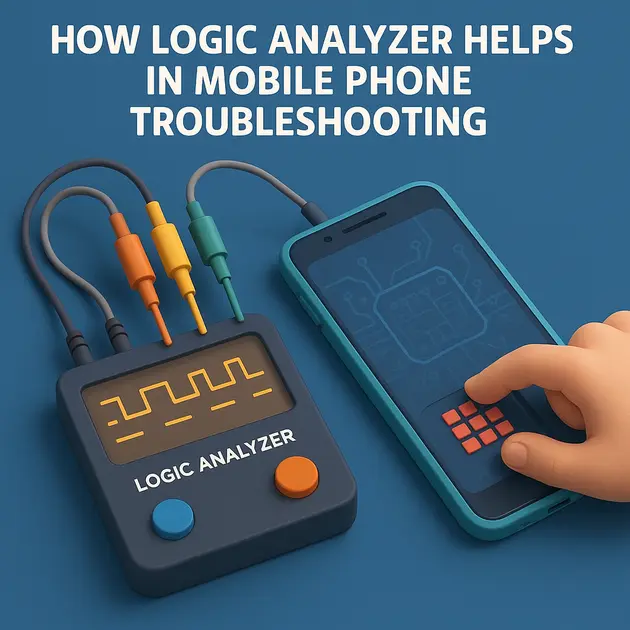
How Logic Analyzer Helps in Mobile Phone Troubleshooting
-
December 5, 2025
-
by
A logic analyzer is used to observe high-speed digital signals in a mobile motherboard.
It does NOT show voltage level like an oscilloscope — instead, it shows:
- Logic High (1) and Logic Low (0)
- Timing
- Protocol decoding
- Signal activity
- Command/Address/Data patterns
This is extremely useful for diagnosing no boot, dead after flash, stuck logo, eMMC/UFS communication faults, I/O line failures, etc.
🔥 Where Logic Analyzer is Useful in Mobile Repair
Below are the main areas where it helps:
1️⃣ Check eMMC/UFS Communication
When a phone is dead/no-boot, you can check if the CPU is talking to eMMC:
You can check signals:
- CMD / CLK / DATA0–DATA7
- RST_n
- VCC / VCCQ I/O behaviour
- For UFS → TX/RX lanes, UniPro, Reset, REFCLK
What the Logic Analyzer shows:
✔ CLK present or missing
✔ CMD busy or idle
✔ DATA lines responding
✔ Bootloader read commands
✔ Sudden stop (eMMC dying)
✔ Signal corruption (broken track / poor reball)
Example Diagnosis
- CLK present + CMD inactive → CPU not requesting data → CPU side issue
- CLK + CMD active but no DATA response → eMMC internal failure
- Data response slow or inconsistent → bad solder balls / track damage
2️⃣ Boot Sequence Testing
Logic analyzers can confirm whether the phone is executing the correct boot steps.
Boot sequence for many Qualcomm/MTK phones:
- PMIC sends power rails
- CPU starts CLK
- CPU loads BootROM
- CPU accesses eMMC/UFS
- Reads bootloader
- Enters Android kernel
You can capture:
- Power-ON trigger (PWRKEY)
- Xtal_CLK / SYS_CLK activation
- eMMC activity right after boot
- Reset timings
If any step is missing, you find the fault.
3️⃣ Check Touch/Display/Camera I2C/SPI Lines
Using protocol decode:
Check I2C:
- SDA
- SCL
If display not working:
✔ Check if CPU is querying the display IC
✔ Check ACK responses
✔ Check touch panel communication
✔ Diagnose missing pull-up resistors
4️⃣ Detect Fake / Dead Chips
Sometimes replacement ICs are:
- Fake
- Not initialising
- Wrong firmware
- Bad soldering
Logic analyzer shows:
❌ No handshake
❌ No start condition
❌ Stuck at logic 0
✔ Correct signal timing if the chip is original
5️⃣ Check SD Card / ISP / JTAG Lines
When recovering data or checking ISP points:
- CE (Chip Enable)
- CLE (Command Latch Enable)
- ALE (Address Latch Enable)
- WE / RE
- R/B
- Data0–7
You can:
✔ Confirm NAND IC is alive
✔ Confirm commands are sent
✔ Check if WE/RE toggling is normal
✔ Detect line short or open track
✔ Validate timing for data recovery operations
6️⃣ Find Broken Tracks / Cold Solder Lines
If a line is not transmitting:
- It will remain always HIGH (pull-up only)
- Or LOW (short to ground)
- Or random unstable (partial broken track)
The logic analyzer makes it visible instantly.
7️⃣ Compare Good Board vs Faulty Board
Capture the same signals on a:
✔ Working motherboard
✔ Faulty motherboard
Then compare waveforms to identify:
- Missing clock
- Missing commands
- Wrong timing
- Dead peripheral
- Shorted line
- Corrupted data transfer
This is a very powerful technique.
📌 Real Example: Phone Not Booting After Reballing
If the CPU reballing was bad:
- CLK will appear delayed or unstable
- Data lines glitching
- CMD not transitioning properly
- All lines stuck HIGH (bad ground)
- All lines stuck LOW (short)
One 5-second capture can confirm whether reballing was successful.
📌 Real Example: Phone Stuck on Logo
Logic analyzer helps check:
- Does eMMC keep responding?
- Does CPU load further partitions?
- Do read commands suddenly stop? (bad sector)
- Does one data line drop? (bad ball)
🔧 Required Equipment
To use it properly:
Recommended logic analyzers:
- DSLogic Plus 100/200/400 MHz
- Saleae Logic Pro 8/16
- LAP-C series
Probes:
- Fine-tip probes
- Ground spring probes
- Clean test pads
- ESD precautions
📘 Summary (Easy to Remember)
| Issue | What Logic Analyzer Shows |
|---|---|
| No Boot | Missing CLK / CMD |
| Dead eMMC | CMD active but DATA dead |
| Bad Reball | Glitches, unstable timing |
| Broken Track | Line stuck HIGH/LOW |
| I2C Fault | No ACK from peripheral |
| Fake IC | No handshake signals |
| Boot Loop | Repeated command sequence |
✅ How Useful Is a 24 MHz Logic Analyzer for Mobile Repair?
✔ Good for Slow & Medium-Speed Digital Signals
A 24 MHz analyzer is suitable for signals up to 4–8 MHz reliably (rule: sample ≥ 3–4× signal).
So 24 MHz LA is OK for:
Supported Tasks (Useful):
- ✔ I2C lines (100 kHz / 400 kHz / 1 MHz)
- ✔ SPI lines up to 5–6 MHz
- ✔ UART/Debug (115 k–3 M baud)
- ✔ Buttons / PWRKEY logic
- ✔ Reset lines
- ✔ Touch screen I2C
- ✔ Sensors (gyro, proximity, etc.)
- ✔ Fingerprint SPI
- ✔ Small EEPROM communication
Meaning:
A 24 MHz logic analyzer is very useful for display, touch, sensors, buttons, and communication faults.
❌ Where 24 MHz Is NOT Useful
Mobile phones use high-speed buses, and 24 MHz is too slow to view them.
Here is what a 24 MHz LA cannot correctly capture:
Not Supported (Too Fast):
1️⃣ eMMC Signals
- eMMC CLK: 26 MHz, 52 MHz, 200 MHz
❌ 24 MHz cannot decode CMD/DATA
❌ you will see garbage or flat lines
2️⃣ UFS Signals
- UniPro high-speed lanes: 500 MHz–1.5 GHz
❌ Completely impossible
Even 500 MHz analyzers cannot decode UFS.
3️⃣ DDR / LPDDR RAM
- Frequencies: 400–1600 MHz
❌ No chance
4️⃣ High-speed Display (MIPI DSI)
- 1–1.5 Gbps per lane
❌ Not possible
Use an oscilloscope instead (for clock presence only).
5️⃣ High-speed Cameras (MIPI CSI)
- Too fast for any logic analyzer under 500 MHz
📌 Simple Summary (Remember This)
| Signal | Frequency | 24 MHz LA | Useful? |
|---|---|---|---|
| UART | <3 MHz | ✔ Yes | Excellent |
| I2C | 100 k–1 MHz | ✔ Yes | Very good |
| SPI | 1–5 MHz | ✔ Yes | Good |
| eMMC | 26–200 MHz | ❌ No | Not usable |
| UFS | 500 MHz–1.5 GHz | ❌ No | Impossible |
| MIPI display | >1 GHz | ❌ No | Impossible |
| MIPI camera | >1 GHz | ❌ No | Impossible |
💡 Practical Real-Life Examples (Mobile Repair)
✔ You can diagnose:
- Touch not responding → Check I2C ACK
- Fingerprint “not detected” → Check SPI lines
- No display backlight → Check enable/INT signals
- Power key not working → Check logic level
- Sensor not working → Check communication
- Charging IC communication with CPU (I2C)
❌ You cannot diagnose:
- No boot due to eMMC
- UFS corruption
- CPU-to-eMMC signal timing
- Bootloader read sequence
- DDR RAM problems
These need 200–400 MHz models like DSLogic Plus / Saleae Pro.
⭐ Final Verdict
✔ A 24 MHz logic analyzer is useful for:
- Sensor lines
- Touch/display control
- Button logic
- Charging IC communication
- Small peripheral IC debugging
❌ But it is not useful for:
- eMMC trouble-shooting
- Dead boot issues
- UFS-based phones
- High-speed CPU communication
-
byBIT
-
December 5, 2025
Tags:
You May Also Like
-
Jan 30, 2026
mobile phone storage upgrade tips In 2026, our smartphones are more capable than ever, but higher-resolution photos and heavier...

-
Jan 27, 2026
In a twist for a technology many of us assumed would only ever get cheaper, solid-state drives (SSDs) and other...
-
Dec 11, 2025
Here is a complete, technician-level troubleshooting guide for ASUS H310M-E motherboard restarting while working (random restart, no blue screen). ✅...

-
Dec 9, 2025
How to Read RAW Dump From Chip-Off Extraction (Full Step-by-Step Guide) How to Read RAW Dump From Chip-Off Extraction 📌...
Sign up to receive our latest updates
Get in touch
Address
152A, Annavalaivu, Thuvakudimalai, Tiruchirappalli, Tamil Nadu – 620 022
Landmark : Near Post Office
Landmark : Near Post Office
bloomingtutorial@gmail.com
