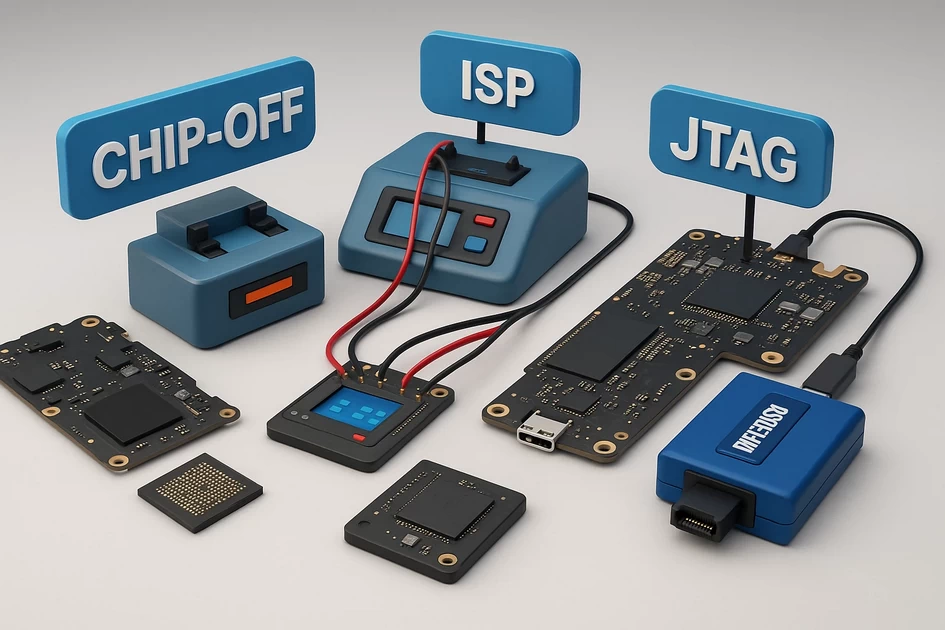
Chip-Off vs ISP vs JTAG: Which Method Recovers More Data?
-
December 9, 2025
-
by
Chip-Off vs ISP vs JTAG: Which Method Recovers More Data?
📌 Table of Contents
- 1. Introduction
- 2. Concept Overview: Three Levels of Hardware Data Recovery
- 3. Chip-Off Data Recovery: Deepest-Level Extraction
- 4. ISP (In-System Programming) Data Recovery
- 5. JTAG Data Recovery
- 6. Chip-Off vs ISP vs JTAG: Side-by-Side Comparison
- 7. Which Method Recovers More Data – and Why?
- 8. Method Selection Flowchart
- 9. When to Use Each Method in Real Cases
- 10. What We Should & Should NOT Do (With Reasons)
- 11. Best Practices for Professional Mobile Data Recovery
- 12. Final Thoughts
- 13. FAQ: Chip-Off vs ISP vs JTAG
1. Introduction
In advanced mobile data recovery, three hardware-level techniques are used to pull data from seriously damaged smartphones: Chip-Off, ISP, and JTAG. All three aim to reach the flash memory that stores the user’s data, but they operate at different depths and with different risks.
As more devices use encrypted eMMC and UFS chips, technicians need to choose the right method not only for success rate, but also for safety and efficiency. This article explains Chip-Off vs ISP vs JTAG: Which method recovers more data, when, and why, using simple conceptual language but with enough technical depth for serious practitioners.
You will learn:
- The core concepts behind Chip-Off, ISP, and JTAG data recovery.
- What each method can and cannot do.
- How much data can realistically be recovered with each technique.
- What you should and should not do during advanced mobile data recovery—and the reasons behind those rules.
- How to choose the right method using a simple flowchart.
2. Concept Overview: Three Levels of Hardware Data Recovery
Think of a smartphone as a small computer with three key parts for data recovery:
- CPU – the “brain” that runs instructions.
- Motherboard / PCB – the “body” that connects everything.
- Flash memory chip – the “hard disk” that stores all photos, videos, and app data.
Chip-Off, ISP, and JTAG all try to talk to the flash memory, but they differ in how deeply they bypass the damaged parts:
- JTAG: Communicates via the CPU’s debugging interface. Uses the processor as a middleman.
- ISP: Connects directly to the storage chip’s data lines, but keeps the chip on the board.
- Chip-Off: Removes the chip completely from the board and reads it in a programmer.
You can imagine it like three levels of surgery:
- JTAG = non-invasive diagnostic scan.
- ISP = keyhole (laparoscopic) surgery.
- Chip-Off = open surgery, fully exposing the internal parts.
3. Chip-Off Data Recovery: Deepest-Level Extraction
Chip-Off Data Recovery means physically removing the memory chip (eMMC, UFS, or raw NAND) from the phone’s motherboard and placing it into a dedicated programmer. The programmer reads a raw binary dump of the chip, from which the technician reconstructs partitions and file systems to recover user data.
3.1 Conceptual Explanation
Conceptually, Chip-Off treats the dead phone as “donor hardware” and focuses only on the storage component. Instead of trying to make the device boot or enter download mode, the technician isolates the memory chip, cleans it, and reads it like an external drive using specialized equipment.
This is the most powerful approach because it removes dependence on:
- Damaged power ICs.
- Shorted CPU or RAM chips.
- Broken PCB tracks and connectors.
3.2 When Is Chip-Off Used?
Typical scenarios include:
- Phone is completely dead—no power, no charge, no response.
- Severe water damage or fire damage on the board.
- Board is cracked or physically bent beyond repair.
- Previous repair attempts have caused heavy damage to power rails.
- ISP or JTAG communication is impossible due to broken traces or missing test points.
3.3 Strengths of Chip-Off
- Highest independence from the main board and CPU.
- Can recover data even from phones that are impossible to boot.
- Provides full raw access to the memory contents (all partitions).
- Suitable for forensic-level mobile data recovery.
3.4 Limitations of Chip-Off
- High risk of damaging the chip with heat if not done correctly.
- Very time-consuming: removal, cleaning, reballing, reading, and reconstruction.
- Hardware-based encryption may still prevent decryption, even with a full dump.
- Phone will never work again after the chip is removed.
4. ISP (In-System Programming) Data Recovery
ISP stands for In-System Programming. In mobile data recovery, ISP means directly connecting to the memory chip’s data, clock, and command lines while the chip remains soldered to the motherboard. Thin wires are soldered to tiny test points or directly to exposed pads that go to the eMMC or UFS device.
4.1 Conceptual Explanation
ISP tricks the storage chip into thinking it is talking to the original CPU, but actually it is talking to an external programmer. The phone’s board remains in place and acts as a “carrier” for the chip, which can be safer than full chip removal.
Because the chip stays on the board, ISP is like “reading the heart while it sits inside the body but through a direct cable.”
4.2 When Is ISP Used?
ISP is preferred when:
- The board has minor or moderate damage but still physically intact.
- Test points or pinouts for the memory chip are documented or can be identified.
- You want to avoid Chip-Off risk and still bypass system boot problems.
- CPU or power issues prevent normal boot, but power can be supplied in a controlled way.
4.3 Strengths of ISP
- No need to physically remove the chip.
- Lower mechanical risk compared to Chip-Off.
- Can provide full raw dump access, similar to Chip-Off, in many cases.
- Often faster setup once pinouts are known.
4.4 Limitations of ISP
- Requires very precise soldering on tiny pads or test points.
- Short circuits or incorrect connections can damage the chip or programmer.
- On heavily corroded or burnt boards, signal integrity may be too poor.
- Not all phones have well-documented ISP pinouts.
5. JTAG Data Recovery
JTAG (Joint Test Action Group) is a standard debugging interface used on many processors and microcontrollers. In mobile data recovery, JTAG connects to the CPU’s JTAG pins to control the processor and dump data from memory via the CPU.
5.1 Conceptual Explanation
With JTAG, the technician uses the CPU as a tool: the CPU is placed in a debug mode where it can read from memory and send the data out through the JTAG interface. It is like “remote controlling” the phone’s brain to read its own memory.
5.2 When Is JTAG Used?
JTAG is typically used when:
- The phone does not boot but still has a largely intact board.
- The CPU and memory chip are believed to be in good condition.
- JTAG pinouts are available for that specific model.
- Other logical methods (EDL, download mode) are not accessible.
5.3 Strengths of JTAG
- No chip removal or micro-jumper work in some cases.
- Can recover data from devices where OS is corrupted but CPU and memory are fine.
- Useful for older devices and some feature phones.
5.4 Limitations of JTAG
- Relies heavily on a functional CPU and memory interface.
- Slow dump speeds compared to ISP and Chip-Off.
- Less suitable for modern encrypted devices.
- Requires detailed JTAG pin information and vendor-specific scripts.
6. Chip-Off vs ISP vs JTAG: Side-by-Side Comparison
| Factor | Chip-Off | ISP | JTAG |
|---|---|---|---|
| Physical Risk | Highest (chip removal & reballing) | Medium (fine soldering) | Low–Medium (board probing) |
| Dependence on CPU/Board | Almost none | Moderate (board must carry signals) | Very high (CPU must cooperate) |
| Typical Data Access Level | Full raw dump of memory | Full or near-full raw dump | Logical/physical via CPU instructions |
| Best Use Cases | Dead / burnt / heavily damaged phones | Non-booting but intact boards | Older or partially functional phones |
| Success Rate (when properly chosen) | Very high, limited mostly by encryption | High, if pinouts & signals are clean | Moderate, strongly model-dependent |
| Speed of Setup | Slow (mechanical work) | Medium | Medium–Fast after configuration |
| Effect on Phone | Phone permanently sacrificed | Board may still be repairable | In many cases, phone can be reassembled |
7. Which Method Recovers More Data – and Why?
There is no single method that always recovers the most data in every situation. The best approach is to choose the method that gives the most reliable access to the memory, with the lowest unnecessary risk.
7.1 General Ranking by Potential Data Access
Assuming the technician is skilled and the case is suitable, the potential depth of data access usually follows this order:
- Chip-Off – maximum raw access, even when the device is totally dead.
- ISP – almost the same access level as Chip-Off if signals are clean.
- JTAG – limited by CPU, scripts, and device security.
7.2 Why Chip-Off Often Recovers More Data
Chip-Off bypasses nearly all other hardware. If the memory chip itself is healthy, a full image can be obtained even if the phone is burnt or broken. This allows the technician to carve out deleted data, app remnants, and file fragments.
However, in strongly encrypted devices, even a perfect Chip-Off dump may be unreadable without the CPU’s keys. In those cases, Chip-Off’s advantage is reduced, and ISP or JTAG that keep the original CPU “in the loop” might be required for decryption.
7.3 Why ISP Can Match Chip-Off in Many Cases
When the board is intact, ISP can provide the same raw access as Chip-Off without removing the chip. Because the chip remains in its original environment, signal integrity can sometimes be better. In many modern labs, ISP is attempted first, and Chip-Off is reserved for cases where ISP fails.
7.4 Where JTAG Still Makes Sense
On older or partially functional devices without strong encryption, JTAG can extract large portions of data without the complexity of Chip-Off or ISP. For some legacy phones, JTAG might actually be the easiest path to a complete logical image.
8. Method Selection Flowchart
Use this high-level flowchart to decide whether to start with JTAG, ISP, or Chip-Off.
                     ┌─────────────────────────────┐
                     │     START: CASE ANALYSIS    │
                     └───────────────┬─────────────┘
                                     ▼
                     ┌─────────────────────────────┐
                     │ Does phone power on or     │
                     │ show any sign of life?     │
                     └───────────────┬─────────────┘
                      YES            │             NO
                      ▼              │             ▼
       ┌─────────────────────────┐   │   ┌─────────────────────────┐
       │ Try logical / software  │   │   │ Is board physically     │
       │ methods first (backup,  │   │   │ intact (no burn, no     │
       │ EDL, download mode).    │   │   │ crack, limited corrosion)?│
       └───────────────┬─────────┘   │   └───────────────┬─────────┘
                       ▼             │          YES       │      NO
              (Still need HW?)      │          ▼          │      ▼
                       ▼             │   ┌─────────────────────────┐
             ┌───────────────────┐   │   │ Try ISP (if pinouts    │
             │ CPU & memory seem │   │   │ known). If ISP fails,  │
             │ healthy but OS    │   │   │ escalate to Chip-Off.  │
             │ corrupt?          │   │   └─────────────────────────┘
             └─────────┬─────────┘   │
                  YES  │   NO        │
                  ▼    │             │
      ┌─────────────────────────┐    │
      │ Consider JTAG dump if   │    │
      │ model is supported.     │    │
      └─────────────────────────┘    │
                                     │
                                     ▼
                     ┌─────────────────────────────┐
                     │ For burnt / cracked boards  │
                     │ or failed ISP: perform      │
                     │ Chip-Off Data Recovery.     │
                     └─────────────────────────────┘
9. When to Use Each Method in Real Cases
9.1 Example Scenarios
Case 1: Water-damaged phone, no power, board heavily corroded.
- JTAG: Not suitable; CPU and JTAG lines likely unstable.
- ISP: Very risky; corrosion may interrupt lines.
- Chip-Off: Best option; isolate and read the memory chip.
Case 2: Phone stuck in bootloop after OTA update; board is clean.
- Try software first (EDL, custom recovery, etc.).
- If that fails, ISP is a strong candidate.
- Chip-Off is a backup plan if the board becomes unstable or ISP does not work.
- JTAG only if the specific model has good support and no strong encryption.
Case 3: Older Android device, no longer boots, but minimal security features.
- JTAG might be easiest for a quick data image.
- If JTAG is not supported, ISP is next; Chip-Off if all else fails.
Case 4: Phone dropped from height; board cracked and some parts missing.
- ISP: Not ideal; tracks and reference points may be broken.
- JTAG: Impossible if CPU or lines are damaged.
- Chip-Off: Only realistic method if the memory chip itself is intact.
10. What We Should & Should NOT Do (With Reasons)
✅ What We SHOULD Do
- Document everything – photos of the board before and after work help with trace repair and forensic reporting.
- Start with the least invasive method – try ISP or JTAG if appropriate before going to Chip-Off.
- Use controlled heat profiles – especially for Chip-Off, to protect the memory chip.
- Verify dumps – calculate hashes or take repeated dumps to confirm integrity.
- Respect encryption – understand that some devices simply cannot be decrypted without keys.
- Explain risks to the customer – especially that Chip-Off sacrifices the phone.
❌ What We Should NOT Do
- Do not rush to Chip-Off just because it feels “more powerful”; unnecessary removal adds risk.
- Do not experiment on critical evidence – practice on donor boards before touching live forensic cases.
- Do not apply uncontrolled high heat – overheating can silently destroy NAND cells.
- Do not mix grounds and power lines when performing ISP or JTAG; incorrect wiring can kill the chip.
- Do not rely on a single tool – if one programmer gives inconsistent dumps, test with another.
- Do not promise 100% recovery – encryption, prior damage, or overwritten data can limit success.
10.1 Reasons Behind These Rules
These guidelines are based on a balance of risk vs reward. Chip-Off offers the deepest access, but it also carries the highest risk of irreversible damage. ISP and JTAG are safer mechanically but depend on cleaner boards and functioning CPUs. Starting with the least destructive method preserves options for later steps.
Likewise, verification of dumps and cautious handling of encryption avoid situations where the lab thinks data is recovered but later discovers that the image is corrupted or unusable. Clear communication with the client protects both the customer’s expectations and the lab’s reputation.
11. Best Practices for Professional Mobile Data Recovery
- Maintain separate workspaces for clean board work, Chip-Off, and analysis to reduce contamination.
- Keep detailed logs of voltages, temperatures, and tools used for each case.
- Use magnification (microscope) not just for soldering but also for diagnosing tiny fractures and corrosion.
- Regularly train on donor boards to improve Chip-Off, ISP, and JTAG soldering techniques.
- Stay updated on model-specific pinouts and encryption trends, as newer phones change frequently.
- Store original dumps safely and work only on copies to avoid accidental modification.
- Integrate good ESD practices and stable power supplies to protect sensitive chips.
12. Final Thoughts
In the battle of Chip-Off vs ISP vs JTAG, there is no single winner in every situation. Instead, each method has a “sweet spot” where it delivers the most data with acceptable risk.
- Chip-Off – best for totally dead, burnt, or heavily damaged devices where nothing else can reach the memory.
- ISP – ideal for non-booting but physically intact phones, offering deep access without chip removal.
- JTAG – useful for older or semi-functional devices where the CPU can still serve as a bridge to the memory.
The real skill of a professional mobile data recovery engineer is knowing when to apply each method, and how to escalate from JTAG to ISP to Chip-Off while minimizing unnecessary risk. When done carefully, this layered approach maximizes the chance of successfully recovering critical data such as photos, videos, and messaging records from even the most challenging cases.
13. FAQ: Chip-Off vs ISP vs JTAG
Q1. Which method recovers the most data in general?
In many severe hardware cases, Chip-Off offers the highest potential for full data recovery because it reads the memory chip directly. However, in devices with strong hardware encryption, Chip-Off may not provide readable data without keys, so ISP or JTAG that keep the CPU involved might be required for decryption.
Q2. Should I always start with Chip-Off to be safe?
No. You should start with the least invasive method that can realistically access the data. Unnecessary Chip-Off work increases the risk of destroying the memory chip and permanently losing data. Typically, technicians try logical methods first, then consider ISP or JTAG, and finally Chip-Off when required.
Q3. Is ISP safer than Chip-Off?
Mechanically, yes. ISP leaves the chip in place and avoids high-heat removal, so the chance of physical chip damage is lower. But ISP still carries risks such as shorting pins or damaging traces, especially on corroded boards.
Q4. When is JTAG still useful in modern mobile data recovery?
JTAG is most useful on older, less-encrypted devices or when vendor tools and pinouts are available. It can provide logical or physical dumps without removing chips or performing complex ISP wiring, making it handy for certain legacy models and investigations.
Q5. Does Chip-Off guarantee recovery from dead phones?
No. Chip-Off greatly increases the chance of recovery, but it cannot fix issues such as internal NAND damage, previously overwritten data, or strong hardware encryption with missing keys. It is a powerful method, not a magic solution.
Q6. Can a phone be used again after Chip-Off, ISP, or JTAG?
After Chip-Off, the phone is normally not usable because the memory chip has been removed or heavily reworked. After ISP or JTAG, the phone may sometimes be restored if the work was clean and components are intact, but in professional data recovery, the main goal is data, not device repair.
Q7. Which method should beginners practice first?
Beginners should practice JTAG and basic ISP soldering on donor boards before attempting any Chip-Off. Chip-Off should only be attempted once temperature control, reballing, and handling of BGA packages are well understood, because mistakes at that level are often irreversible.
-
byBIT
-
December 9, 2025
You May Also Like
-
Jan 30, 2026
mobile phone storage upgrade tips In 2026, our smartphones are more capable than ever, but higher-resolution photos and heavier...

-
Jan 27, 2026
In a twist for a technology many of us assumed would only ever get cheaper, solid-state drives (SSDs) and other...
-
Dec 12, 2025
If power (voltage/current) is passing in the motherboard I/O port shield (USB/HDMI/LAN metal frames), this is a dangerous fault and...
-
Dec 11, 2025
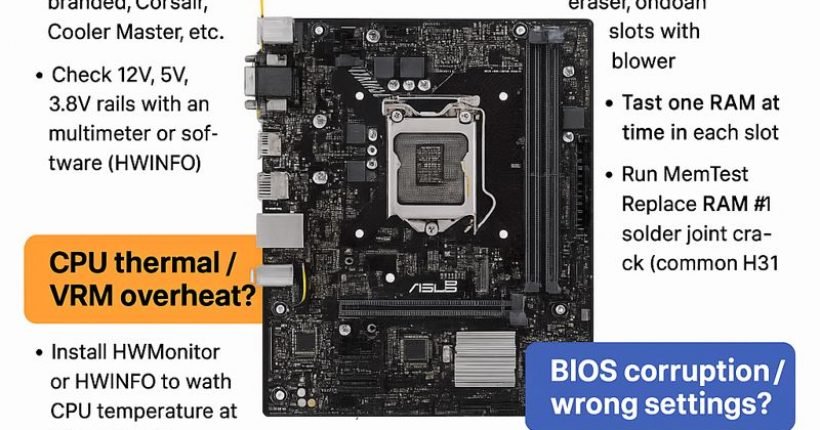
Here is a complete, technician-level troubleshooting guide for ASUS H310M-E motherboard restarting while working (random restart, no blue screen). ✅...
Sign up to receive our latest updates
[mc4wp_form id=3101]
Get in touch
Address
152A, Annavalaivu, Thuvakudimalai, Tiruchirappalli, Tamil Nadu – 620 022
Landmark : Near Post Office
Landmark : Near Post Office
bloomingtutorial@gmail.com
