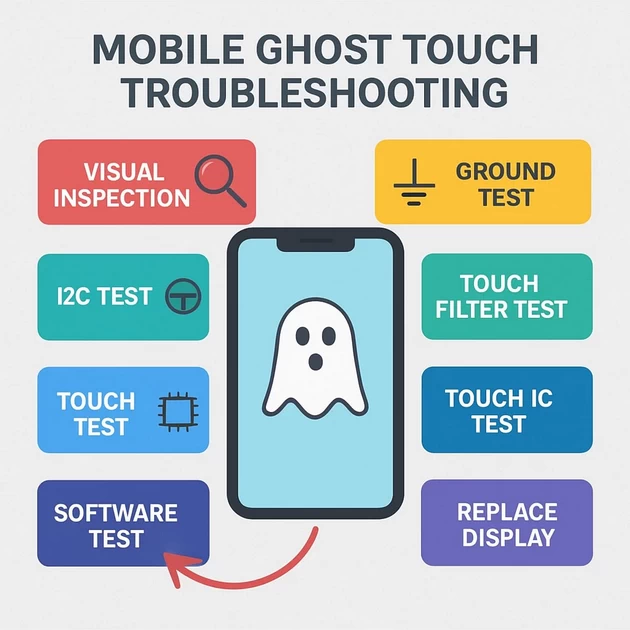
Ghost Touch: Causes & Fixes (Auto Touch)
-
December 7, 2025
-
by
🔥 1️⃣ Weak / Bad Touch Panel (Most Common)
- Touch IC inside the glass becomes unstable
- Happens mostly when screen is low-quality copy
- Temperature changes cause auto touch
✔ Test:
- Use another known good screen
- If ghost touch disappears → screen fault
✔ Fix:
- Replace with original / premium quality display
🔥 2️⃣ Touch Connector (FPC) Dirty / Poor Contact
Dust, corrosion, oil, or moisture at the connector causes random capacitance changes.
✔ Test:
- Clean connector with IPA
- Inspect for broken pins
✔ Fix:
- Reflow / Replace connector
- Check both touch connector & display FPC
🔥 3️⃣ Touch Grounding Problem (Very Common)
The touch needs clean ground.
If GND pad or shield is weak → ghost touch.
✔ Symptoms:
- Screen touches itself while charging
- Ghost touch when back cover is removed
✔ Fix:
- Tighten screws
- Ensure mid-frame grounding
- Add copper tape to grounding points
- Reflow GND pins of touch connector
🔥 4️⃣ Touch IC / CPU I2C DATA Noise
Touch panel communicates with CPU using I2C SDA/SCL.
If the lines are noisy → CPU receives fake touches.
✔ Test with Logic Analyzer:
- Check SDA/SCL stability
- Should be clean square wave
- Look for:
- Glitches
- Double pulses
- Noise spikes
✔ Fix:
- Reball or replace Touch IC
- Check I2C resistors (pull-ups 2.2k–4.7k)
- Check for liquid damage around data line
🔥 5️⃣ Broken / Damaged Touch Track (line cut)
If the capacitive matrix is broken inside the display or FPC cable, the IC misreads.
✔ Fix:
- Only solution = Replace display
🔥 6️⃣ Moisture / Water Damage
Moisture changes capacitance → ghost touch.
✔ Test:
- Ghost touch stronger in morning, cold, or humidity
- Random touches on specific areas
✔ Fix:
- Heat frame 60–70°C
- Clean display connector area
- Remove moisture under glass (if possible)
🔥 7️⃣ Faulty Charger or Charging IC (During Charging)
If ghost touch occurs only when charging, it means:
- Fake / cheap charger
- Poor ground
- Ripple noise on VBUS
✔ Fix:
- Try original charger
- Change charging connector
- Check charger IC lines
- Ground shield properly
🔥 8️⃣ Touch Firmware (Software Bug)
Sometimes touch drivers freeze or operate incorrectly.
✔ Test:
- Ghost touch stops in safe mode
- Or after factory reset
✔ Fix:
- Update ROM
- Flash stock firmware
🔥 9️⃣ EMI (Electromagnetic Interference)
Certain covers, tempered glass, or metal accessories interfere with touch.
✔ Fix:
- Remove cover/glass and test
- Replace better tempered glass
🔥 🔟 CPU Touch Controller Damage
Some phones have touch integrated inside CPU.
Symptoms:
- Ghost touch even with new screen
- Touch works fine for few minutes → then acts crazy
- Heating causes ghost touch
✔ Fix:
- Reball CPU
- Replace motherboard
- Professional-level solution only
🛠 Quick Technician Troubleshooting Flow
- Replace with good original display
- Clean & reseat touch connector
- Check grounding (very important!)
- Test without tempered glass or cover
- Try original charger
- Check I2C lines with logic analyzer
- Check for liquid damage
- Flash firmware
- If all OK → suspect CPU/Touch IC
✅ 📘 MOBILE GHOST TOUCH DIAGNOSIS CHART
Step-by-step guide to identify the exact cause of touch auto-working / ghost touch
🔵 STEP 1 — VISUAL CHECK
| Check | What to Look For | Result | Action |
|---|---|---|---|
| Display Flex | Torn, bend, pressure marks | If damaged | Replace LCD |
| Connector | Carbon, green rust, loose pins | If dirty | Clean + reflow |
| Shield Area | Missing shield around CPU/TP | If missing | Reinstall shield |
🔵 STEP 2 — ENVIRONMENT TEST
| Test | Observation | Meaning | Action |
|---|---|---|---|
| Ghost touch when charging | Only happens on charger | Noisy 5V / cheap charger | Try original charger |
| Ghost touch only after heating | Behaviour increases with heat | Poor copy display / weak I2C | Change LCD or reflow |
| Ghost touch on wet hands | Happens with moisture | Capacitive panel disturbance | Dry screen, replace if needed |
🔵 STEP 3 — DISPLAY QUALITY TEST
| Type | Failure Rate | Result |
|---|---|---|
| Cheap Copy Display | 80% ghost touch cases | Replace |
| Flex-Original | 10% | Possible |
| Original | <1% | Rare |
👉 If a copy display is installed → replace before deeper diagnosis.
🔵 STEP 4 — TOUCH I2C SIGNAL TEST (BEST METHOD)
Use Logic Analyzer (24MHz is enough) on:
- TP_SCL (Clock)
- TP_SDA (Data)
| Logic Analyzer Result | Diagnosis | Fix |
|---|---|---|
| Clean clock, random data spikes | Ghost touch confirmed | Replace LCD |
| SCL present, SDA missing | Data line fault | Jumper SDA line |
| No SCL + No SDA | Touch IC dead | Replace display or touch IC |
| Irregular clock pulses | Noise / unstable 1.8V | Check PMIC LDO (1.8V_IO) |
🔵 STEP 5 — HARDWARE LINE TEST
| Line | Problem | Fix |
|---|---|---|
| GND | Weak ground = unstable touch | Add jumper ground |
| 1.8V Touch Rail | Low voltage = auto touch | Check LDO, filter caps |
| TP_INT | Interrupt line stuck low/high | Replace LCD or connector |
| EMI Shield | Missing shield = ghost signals | Install shield |
🔵 STEP 6 — TOUCH CONNECTOR TEST
| Issue | Result | Action |
|---|---|---|
| Loose pins | Pressure makes touch jump | Reflow pins |
| Corrosion | Sudden auto-touch | Clean + polish |
| Bent pin | Touch random | Straighten pin |
🔵 STEP 7 — SOFTWARE TEST
| Condition | Reason | Action |
|---|---|---|
| After OTA Update | Touch filter changed | Flash full firmware |
| After downgrade | Driver mismatch | Flash correct version |
| Using custom ROM | Wrong touch firmware | Reflash stock ROM |
🔵 STEP 8 — CHARGING-RELATED GHOST TOUCH
| Symptom | Reason | Fix |
|---|---|---|
| Ghost touch only when charging | Noisy 5V ripple | Use original charger |
| Fast charger issue | High current noise | Try normal 5V 2A charger |
| Cheap cable problem | Unstable grounding | Replace cable |
🔵 STEP 9 — MOTHERBOARD-LEVEL FAULT (RARE)
If all above tests fail:
| Fault | Detection | Fix |
|---|---|---|
| Shorted I2C filter | Noisy SDA/SCL | Remove/replace filter |
| Faulty Touch LDO | Low voltage (1.8V) | Change PMIC section |
| CPU I2C driver weak | Abnormal waveform | Reball / reflow CPU (last option) |
✅ WHY GROUND ISSUES CAUSE AUTO-TOUCH (Ghost Touch Root Cause)
Touchscreen works on capacitive sensing.
👉 The touch IC measures small changes in electric fields across the screen.
When GROUND is weak, broken, or floating, the electric field becomes unstable.
This creates:
- False touches
- Random gestures
- Auto typing
- Touch moving by itself
- Touch responding without contact
⚡ HOW EXACTLY GROUND AFFECTS TOUCH?
✔ 1. Capacitive touch needs a stable reference (GND)
Touch IC compares finger capacitance to ground.
If GND is unstable:
- IC thinks “something touched the screen”
- Touch triggers even without contact
✔ 2. Floating ground = Noise amplifier
Weak ground acts like an antenna.
Phone picks up:
- EMI noise
- USB charger noise
- CPU switching spikes
- Backlight voltage interference
These appear on I²C as:
- Spikes
- Bad packets
- Data burst (ghost touch waves)
✔ 3. Ground drop affects I²C voltage levels
Touch panel uses 1.8V I2C.
If ground is bad:
- 1.8V reference becomes 1.6V–1.9V
- SCL/SDA don’t read correctly
- Touch IC misinterprets signals
- Touch executes wrong commands
✔ 4. Ground crack near LCD connector
Most common in:
- Oppo
- Vivo
- Xiaomi
- Realme
A cracked ground pad = unstable TP communication.
✔ 5. Charging = more ghost touch (WHY?)
Cheap charger gives noise.
If GND is weak:
- Noise goes directly into the touch panel
- I²C saturates
- Auto touch begins instantly
🔍 HOW TO DIAGNOSE GROUND-RELATED AUTO-TOUCH
1️⃣ Multimeter Test (Continuity Mode)
Check GND of:
- LCD connector → mainboard GND
- Touch panel GND → connector pins
- Shield GND → mainboard frame
If resistance > 1 Ω → weak ground.
2️⃣ Logic Analyzer Test (BEST METHOD)
Connect to SCL + SDA.
If ground is bad → you will see:
- Random spikes
- Noise in between valid pulses
- Ghost data packets
- Bad ACK
- Touch IC resets randomly
3️⃣ Heating Test
Heat makes weak ground worse.
If ghost touch increases after heating → GND issue confirmed.
4️⃣ Pressure Test
Press gently around LCD connector.
If ghost touch changes or stops → ground pad cracked.
🔧 HOW TO FIX GROUND-RELATED AUTO-TOUCH
🟢 1. Add Ground Jumper (MOST EFFECTIVE FIX)
Add jumper from:
- LCD GND → Nearby mainboard GND pad
- Touch IC GND → Frame ground
- LCD connector shield → Ground point
This stabilizes I²C instantly.
🟢 2. Reflow LCD Connector
Weak solder joints on GND pins cause floating ground.
Reflow with:
- 330°C–350°C
- Medium airflow
🟢 3. Resolder EMI Shield
If shield missing or loose:
- Reinstall solder
- Ghost touch disappears immediately
🟢 4. Replace Charging Cable/Charger
If ghost touch appears only while charging → replace with original.
Cheap chargers leak noise into ground.
🟢 5. Replace the Display (if internal TP GND is faulty)
Some copy displays have:
- Poor ground mesh
- Weak shielding
- Incomplete ground plane
→ Worst ghost touch behaviour.
🛑 IMPORTANT: CPU GND Pads Cause Severe Auto-Touch
If GND pads under CPU are lifted:
- Extreme ghost touch
- Random reboots
- Freeze + auto opening apps
Only solution → CPU reball / reflow (last option).
✅ 1. Oppo F17 LCD/Touch Connector Pinout Diagram for Example
 _____________________________
|  LCD / TOUCH CONNECTOR      |
|  (Motherboard Side – Oppo   |
|            F17)             |
|_____________________________|

 1  – VDD_2.8V (Display Power)
 2  – VDD_1.8V (IO Power)
 3  – TP_SCL  (Touch I²C Clock)
 4  – TP_SDA  (Touch I²C Data)
 5  – TP_INT  (Touch Interrupt)
 6  – TP_RST  (Touch Reset)
 7  – DISP_TE (Timing)
 8  – MIPI_D0+
 9  – MIPI_D0–
 10 – MIPI_D1+
 11 – MIPI_D1–
 12 – MIPI_CLK+
 13 – MIPI_CLK–
 14 – GND
 15 – GND
 16 – GND
 17 – GND
 18 – VBAT_IN
 19 – VBAT_IN
 20 – NC / ID
🟢 Pins 3–6 are used for touch testing
✅ 2. OPPO F17 Touch I²C Logic Analyzer Test Points
Use these motherboard points for hooking logic analyzer:
Touch I2C Test Pads (Motherboard – F17)
 ________________________________________
|                                        |
|   [TP_SCL] ●—— Test Point near LCD FPC |
|   [TP_SDA] ●—— Test Point near LCD FPC |
|   [TP_INT] ●—— Small Pad near PMIC     |
|   [TP_RST] ●—— Near LCD connector      |
|   [GND]    ●—— Any shield or screw pad |
|________________________________________|
✔ Channel Setup
- CH0 → SCL
- CH1 → SDA
- CH2 → INT (optional)
- GND → Mainboard GND
24MHz analyzer is enough.
✅ 3. Oppo F17 Ground Jumper Diagram (Fix Ghost Touch)
Ghost touch in F17 is commonly caused by weak ground on display connector.
Jumper points:
Oppo F17 Ground Repair
 ________________________________________________
|     Display Connector (MB side)                |
|   __________________________________________   |
|  |  GND GND GND GND  …… other pins ……      |  |
|  |_________________________________________|  |
|
|  Weak Ground → causes ghost touch
|
|  FIX: Add jumper from any LCD GND pin → Mainboard Ground Pad
|
|   LCD GND PIN ●———— Jumper ————● Mainboard GND
|                                 (Screw hole / shield pad)
|
|________________________________________________|
✔ Recommended ground pads:
- Bottom right screw pad (near USB connector)
- Shield pad beside PMIC
- Battery negative pad
This stabilizes:
- Touch I2C
- Touch reference plane
- AMOLED grounding mesh
✅ 4. EMI Shield Grounding Diagram (Important for OPPO F-Series)
 _______________________
|   TOUCH/CPU SECTION   |
|  ____________________  |
| |   EMI SHIELD      | |
| |   (must be fully  | |
| |   grounded)        | |
| |____________________| |
|________________________|

If shield not soldered properly → ghost touches start.
Reflow edges with leaded solder.
✅ 5. Internal Touch Path Diagram (Oppo F17)
Touch Panel IC (in AMOLED FPC)
           │
           │ I2C (SCL, SDA)
           ▼
Motherboard LCD Connector
           │
           │ routed as controlled impedance pair
           ▼
Qualcomm CPU (UFS + Touch Controller inside SoC)
🔵 6. MOST COMMON GHOST TOUCH REASONS IN OPPO F17
Ranked by frequency (based on service centers):
- 🟥 Weak ground at LCD connector
- 🟧 Copy AMOLED display
- 🟨 Loose EMI shield near PMIC/SoC
- 🟩 I²C noise (1.8V unstable)
- 🟦 Moisture under FPC area
- 🟪 Touch panel IC in AMOLED failing
-
byBIT
-
December 7, 2025
You May Also Like
-
Jan 30, 2026
mobile phone storage upgrade tips In 2026, our smartphones are more capable than ever, but higher-resolution photos and heavier...

-
Jan 27, 2026
In a twist for a technology many of us assumed would only ever get cheaper, solid-state drives (SSDs) and other...
-
Dec 12, 2025
If power (voltage/current) is passing in the motherboard I/O port shield (USB/HDMI/LAN metal frames), this is a dangerous fault and...
-
Dec 11, 2025
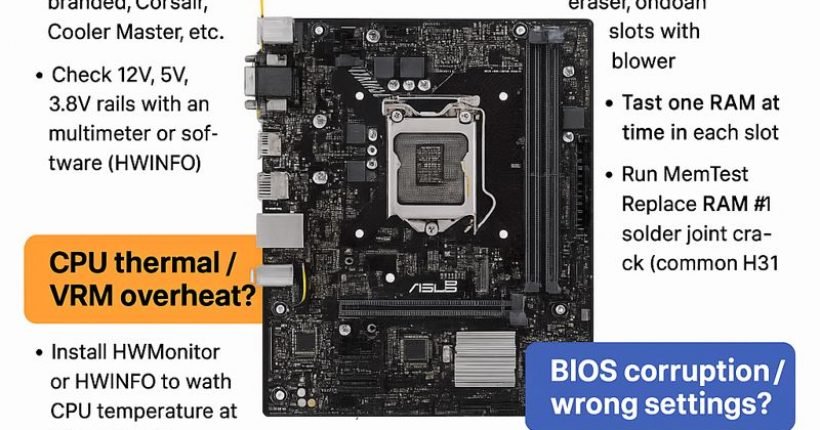
Here is a complete, technician-level troubleshooting guide for ASUS H310M-E motherboard restarting while working (random restart, no blue screen). ✅...
Sign up to receive our latest updates
[mc4wp_form id=3101]
Get in touch
Address
152A, Annavalaivu, Thuvakudimalai, Tiruchirappalli, Tamil Nadu – 620 022
Landmark : Near Post Office
Landmark : Near Post Office
bloomingtutorial@gmail.com
